Video Assembly API: How to Build Videos With Code
Video teams keep hitting the same wall. The edit is repetitive, the volume is high, and doing it by hand does not scale. A video assembly API handles the repetitive half so your time goes to the parts that need taste. Here is how these APIs work, what they are good at, and where a browser timeline still wins.
If you make the same kind of video over and over (product clips, caption reels, localized cutdowns, weekly recaps), you have probably wondered whether code could do the assembly for you. It can. A video assembly API takes a structured description of an edit, a timeline of clips, audio, text, and effects, then renders a finished video from it. You send the instructions, the service handles the compositing and the export. This guide walks through what that means in practice, what the building blocks are, and when reaching for an API beats opening an editor.
In short
- A video assembly API renders finished video from a structured timeline you define in code, usually JSON.
- You describe tracks, clips, timing, captions, and audio; the service composites and exports the file.
- It is built for volume and repetition: batch product videos, localized versions, templated social cuts.
- Gather or generate your raw assets first, then feed them to the API for assembly and render.
- For anything that needs hands-on art direction, a browser timeline still beats a pure API call.
Quick answer:
- A video assembly API is a service that renders video from a structured edit description (tracks, clips, timing, text, audio) instead of a manual timeline.
- Use it for repetitive, high-volume work like batch product videos, localized versions, and templated social clips.
- Assemble the raw assets first (footage, generated clips, voiceover, captions), then send the timeline to the API to composite and export.
What a video assembly API actually does
A traditional editor is you, a timeline, and a mouse. A video assembly API moves that timeline into code. Instead of dragging a clip onto track two at four seconds, you write it: a clip object, a start time, a duration, a track index. The service reads the full description, layers everything in order, and renders one file. Nothing about the output is magic. The same operations you would run by hand, like stitching several clips into one sequence, trimming, and layering text, still happen. They just happen from a payload instead of a cursor.
The payload is almost always JSON. You define a canvas (size, frame rate, duration), a set of tracks, and the clips that sit on each track with their timing. Send that to the render endpoint and you get back a job. When the job finishes, you get a URL to the finished MP4. Because the whole edit is data, you can template it: swap the product name, the background clip, or the caption text, and render a hundred variations from one shape.
The building blocks: timeline, tracks, and render
Most assembly APIs share three ideas, and they map cleanly onto what you already know from any editor. The timeline is the master clock. Tracks are the stacked layers that play at the same time. The render is the final pass that flattens everything into one file. If you understand those three, you understand the model.
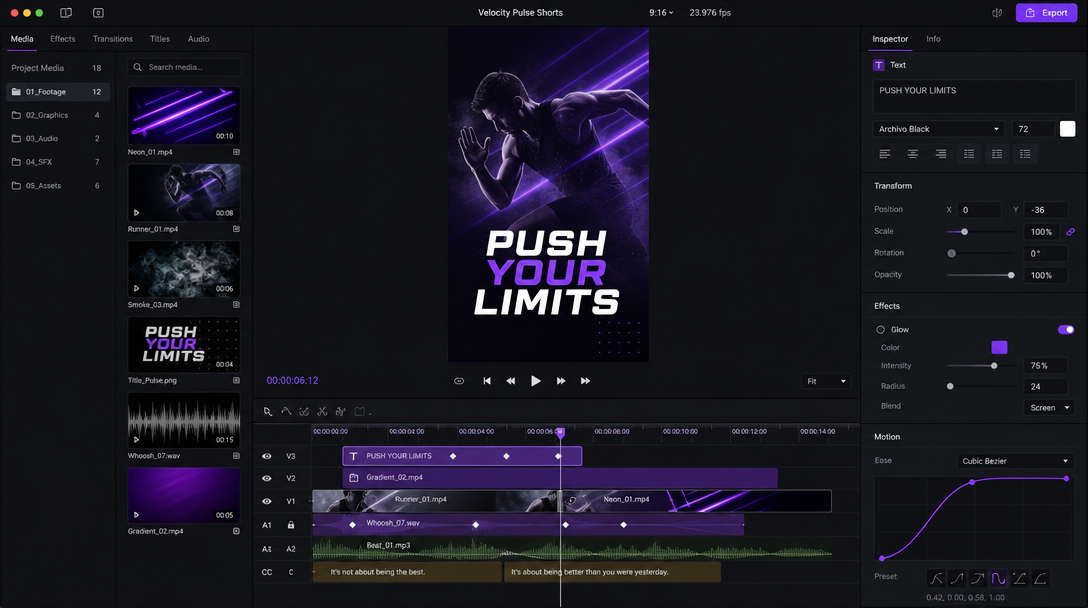
Layers stack the same way they do in a manual editor, so a lower third or a video overlay sits on a track above your base clip and carries its own timing. Order matters: whatever sits higher in the track list draws on top. Timing matters just as much, because a caption that starts a half second late reads as broken. The value of doing this in code is that once the timing logic is right, it stays right across every render you fire off.
When an API beats manual editing, and when it does not
A video assembly API earns its place on volume and repetition. If you need fifty product videos, one per SKU, with the same intro, a swapped clip, and a swapped price, an API renders them while you sleep. The same goes for localized versions of one ad, weekly automated recaps, or templated social cuts pulled from a spreadsheet. This is where batch product video work stops being a person clicking export a hundred times.
It does not win everywhere. A one-off hero video with real art direction, custom motion, and a director watching every frame is faster and better by hand. APIs are literal: they render exactly what you describe, and they have no taste. If you are still deciding whether to generate the footage or edit existing footage, this breakdown of video editing versus AI generation is a useful frame before you commit a pipeline to either path. The honest rule is simple. Repetition goes to the API. Judgment stays with a human.
Getting assets into the pipeline
An assembly API composites and renders, but it does not invent your raw material. You still need footage, product shots, generated b-roll, a voiceover, and a music bed before anything can be assembled. Sourcing that material is often the real bottleneck, not the render itself.
A common setup is to produce the raw clips and variations upstream in an AI workflow automation platform, then hand the finished assets to your assembly API for timing, captions, and the final render. That split keeps each stage doing one job well. Generation makes the pieces, assembly puts them in order, and you review the result instead of building every frame from scratch.
Captions and audio: the details that break at scale
Captions are where automated pipelines most often look cheap. Timing drift of even a few frames makes text feel disconnected from speech, and hardcoded line breaks wrap badly on vertical formats. If your videos live on social, treat adding video subtitles as a first-class step in the timeline, not an afterthought bolted on at the end. Get the word timing from a transcript, then render captions as a real track with its own styling.
Audio has its own traps. Levels that sound fine on one clip can spike when a music bed and a voiceover play together, and nothing tanks a batch faster than fifty videos that are all slightly too loud. Set a target loudness once, duck the music under speech, and keep that logic in the template so every render inherits it. The point of assembling in code is that you fix these rules a single time and they hold across the whole run.
Editable output beats a baked file
One quiet limitation of a pure render API is that you get back a finished MP4 and nothing else. If a client wants the caption moved or the accent color changed, you rebuild from the payload and render again. That round trip is fine for pure automation, less fine when a human needs to touch the result.
This is the gap an agentic editor fills: agents set the keyframes and timing, then return editable layers and tracks you can art-direct in the browser, not a baked file you have to regenerate. It also means a teammate can jump in through collaborative video editing without waiting on whoever owns the render script. The best pipelines use both: an API for the repetitive assembly, and a real timeline for the last ten percent that needs a person.
Frequently asked questions
What is the difference between a video assembly API and an AI video generator?
A generator creates new footage from a prompt or an image. An assembly API does not create footage; it arranges existing clips, audio, and text on a timeline and renders the result. They are complementary. You often generate assets first, then assemble them.
Do I need to know how to code to use one?
To call the API directly, yes, because you send a JSON payload and handle the render job. That said, many teams wrap the API behind a template so non-developers can swap text and clips through a form or a spreadsheet, which removes most of the coding from day-to-day use.
What formats can a video assembly API output?
Most render MP4 as the default, with common aspect ratios for 16:9, 9:16, and 1:1. Many also export MOV or GIF. The aspect ratio is usually just a property on the canvas, so producing a vertical and a square cut of the same edit is a config change, not a re-edit.
Is it cheaper than editing by hand?
At volume, almost always. The cost is the upfront work of building the template and the pipeline. Once that exists, the marginal cost of one more video is a render call, which is far cheaper than an editor's hour. For one-off videos, the setup rarely pays off.
The takeaway
A video assembly API is the right tool when your video work is repetitive, high-volume, and templated. Describe the timeline once, feed it assets, and let the render engine do the assembly at scale. Keep a real editor in the loop for the work that needs judgment, and use the API for everything that does not. Decide which of your videos are truly one-off and which are just the same edit fifty times, and route each to the tool built for it.
Founder of Motionbox and Gluely. Building tools for creators.