Video Creation and Editing API: How It Works and How to Choose an Approach
A video creation and editing API turns video production into something you can call from code. You send a spec, a render service returns a finished clip. This guide explains how these APIs work under the hood, the three main ways to drive one, and where automation ends and hands-on art direction begins.
If you make a lot of video, you eventually hit the same wall. The edits are repetitive, the volume keeps climbing, and rendering every clip by hand stops making sense. A video creation and editing API is what teams reach for when they want to produce video from code instead of dragging clips across a timeline one project at a time. It is the difference between editing a single video and running a small factory that outputs hundreds of them.
This guide is for the person who has heard the phrase and wants to understand what it actually means before picking a tool. We will cover how a render pipeline works, the three architectures you can choose from, how captions and batch jobs get automated, and the point where you still want to open a real editor and art direct the result.
In short
- Define a video as data, either a JSON timeline, a code composition, or a prompt an agent can expand.
- Send that definition to the API, which resolves your assets and composites the frames.
- The service encodes the frames into a file and hands back a URL, usually through a webhook when the render finishes.
- Feed the output into the next step, whether that is publishing, batch variants, or a manual polish pass.
- Keep the parts that need taste, like pacing and motion, under human control.
Quick answer:
- A video creation and editing API is a service you call with code to build, edit, and render video without opening an editor for each clip.
- You describe the video as structured data (scenes, tracks, clips, captions, timing), the API composites and encodes it, then returns a downloadable file.
- It is built for scale and repetition. For pacing, motion feel, and final art direction, a hands-on timeline editor still does the job better.
What a video creation and editing API actually does
Strip away the marketing and every one of these APIs runs the same lifecycle. You submit a definition of the video. The service resolves your assets, meaning it pulls in the images, clips, audio, and fonts you referenced. It composites the timeline frame by frame, stacking layers and applying any motion or transitions. Then it encodes those frames into a file, usually an MP4, and stores it somewhere you can fetch.
The part that trips up newcomers is that rendering is asynchronous. A thirty second clip can take real seconds or minutes to build, so you do not wait on the request. Most APIs accept your job, return an id, and call a webhook when the file is ready. If you are automating anything at volume, you design around that callback from the start rather than polling in a loop. Understanding this pipeline is the single most useful thing before you compare vendors, because it tells you what every tool has in common and where they actually differ. The same frame-by-frame thinking sits underneath a manual editor too, which is why a YouTube video editor and a render API describe a clip in surprisingly similar terms.
The three ways to drive one
Most tools fall into one of three camps, and picking the right camp matters more than picking the exact brand.
Template and JSON first. You define the video as structured data. A scene holds tracks, tracks hold clips, clips have timing and position. Services in this camp let you build a template once, then swap in different text, images, or clips per render. This is the most common approach and the easiest for non-developers to reason about, because the JSON reads like a description of the finished video.
Code first. Here the composition is written in a real programming language, often with a React style model where you describe frames as components. You get full control and can express logic that templates cannot, at the cost of writing and maintaining code. This suits engineering teams who want their video layer versioned and tested like the rest of their stack.
Agent first. The newest camp is built for AI agents rather than humans. The agent writes a declarative description of the video, the service validates it, and a render comes back. The interesting shift is that the output should stay editable, so a human can open the result and adjust it rather than re-prompting from scratch. If you are already using AI to plan content, our AI video generation guide covers how that upstream step feeds a render pipeline.
Automating captions and subtitles
Captions are the most requested automation, and the technical chain is worth knowing. First the audio runs through speech recognition to produce a transcript with word level timestamps. Then those words get grouped into readable lines and styled, either as a separate track or burned into the pixels. For multi-language output, the transcript is translated before styling, which is why one source clip can produce a dozen localized versions.
An API is great at the mechanical part of this, but caption timing and line breaks are where machine output often reads wrong. Splitting a sentence at the wrong word or holding a line a beat too long is the kind of thing you feel more than you measure. Many teams let the API do the transcription and first pass, then fix the awkward breaks in an editor where you can add subtitles to video and nudge the timing by eye.
Batch and templated video at scale
The real payoff of an API is volume. Once a template exists, generating a thousand variants is a loop that swaps merge fields, a product name here, a price there, a different background clip per row of a spreadsheet. This is how personalized ads, real estate listings, and localized product videos get made without a person touching each one.
The practical concerns at scale are queueing and idempotency. You want jobs to retry safely without producing duplicates, and you want a render farm that can run many jobs at once so a batch of a thousand does not take all day. Marketing teams lean on this for ad creative, turning one concept into many hooks and aspect ratios. When those variants need a human eye before they ship, pulling them into a shared workspace for collaborative video editing keeps the review loop tight.
Motion graphics and where the API hands off
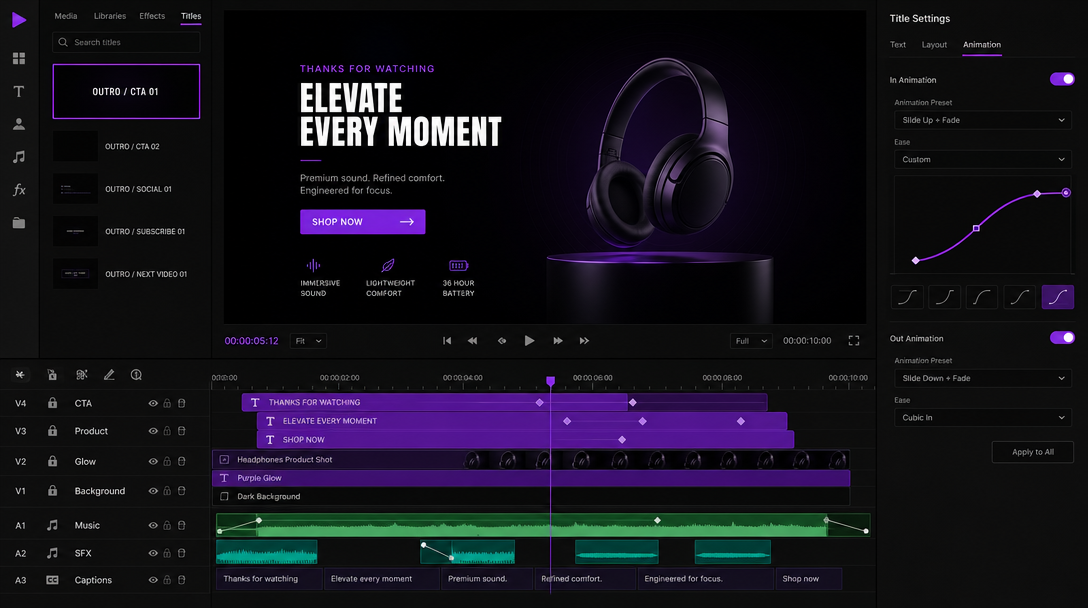
Motion is where the two worlds meet and also where they split. Programmatic motion comes from keyframes and interpolation, a value at one point in time, a value at another, and an easing curve that decides how it travels between them. An API can set those keyframes reliably, which is perfect for lower thirds, animated captions, and data driven charts that follow a formula.
What an API is not good at is the feel of motion. Whether a title lands with the right weight, whether a cut breathes, whether the easing reads as confident or clumsy, those are art direction calls. This is the natural handoff point. A common pattern is to generate source clips upstream with an AI video creation and editing API, then bring the results into a real editor where the render output stays as editable layers and tracks rather than a baked file you cannot touch.
That handoff is the whole argument for keeping a hands-on tool in the loop. You automate the parts that are repetitive and deterministic, and you keep the parts that need taste under your own hands. A product video maker that gives you the timeline back after the automated pass is far more useful than one that only spits out a finished MP4.
Frequently asked questions
What is a video creation and editing API?
It is a service you call with code to build, edit, and render video without opening an editor for each clip. You describe the video as structured data, the service composites and encodes it, then returns a file you can download or publish.
Do I need to be a developer to use one?
Not always. Template first tools let you build a video once and swap in new content through a form or a no-code automation platform. Fully custom compositions and code first tools do require someone comfortable with an API and a bit of scripting.
How long does a render take?
It depends on length, resolution, and effects, but expect real seconds to a few minutes per clip. Because it is asynchronous, you submit the job and get notified when the file is ready rather than waiting on the request.
Can an API replace a human editor?
For high volume and repetitive work, largely yes. For pacing, motion feel, and final art direction, no. The strongest setup uses an API for the repetitive bulk and a hands-on timeline for the polish, so you get both speed and taste.
What output formats do these APIs support?
Most return MP4 as the default, with options for different resolutions and aspect ratios so you can render the same project in 16:9, 9:16, and 1:1. Some also output GIF and MOV, and a few can produce a GIF from your clips directly.
The bottom line
A video creation and editing API is the right tool when volume and repetition are your problem. Learn the render pipeline, pick the camp that matches your team, and automate the mechanical parts without shame. Then draw a clear line at the work that needs a human, and keep an editor ready for the moment the automated pass hands you a timeline to art direct. That split, machine for scale and hands for taste, is what keeps the output good as the volume grows.
Founder of Motionbox and Gluely. Building tools for creators.